
- Blog Post
- Estimated Read Time 1:00
- Intermediate
Ask AI - How does the RegBot Work?
NOTE: RegBot is only available to regulations subscribers who are signed in to BillTrack50.
RegBot is a way of using AI to query an individual regulation document.
First, navigate to a document within a regulation - click on the regulation in the regulation sheet, click the Documents tab, and click Detail next to the document.
Beneath the AI Summary and the Version Date you will see the Ask AI button:
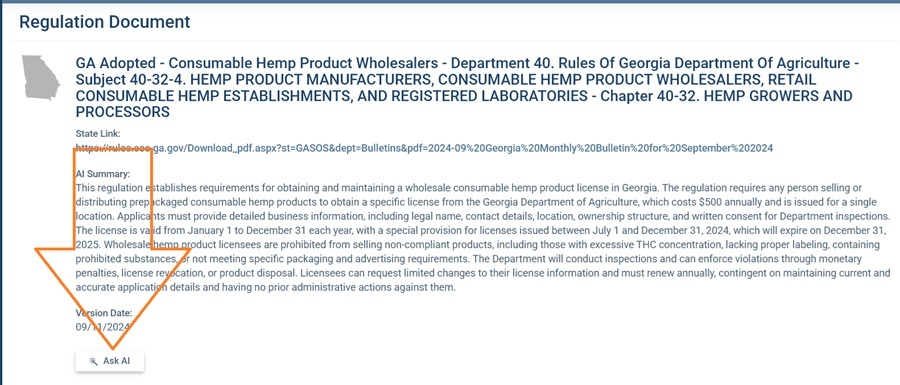
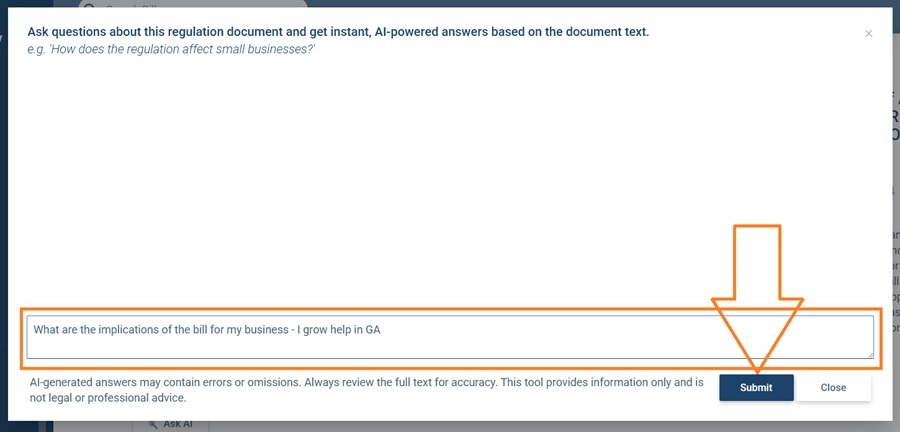
This is a feature that we call RegBot. When you click on the button a window will pop up. Type your question in the box and click Submit:
The AI will analyze the regulation document and provide an answer:
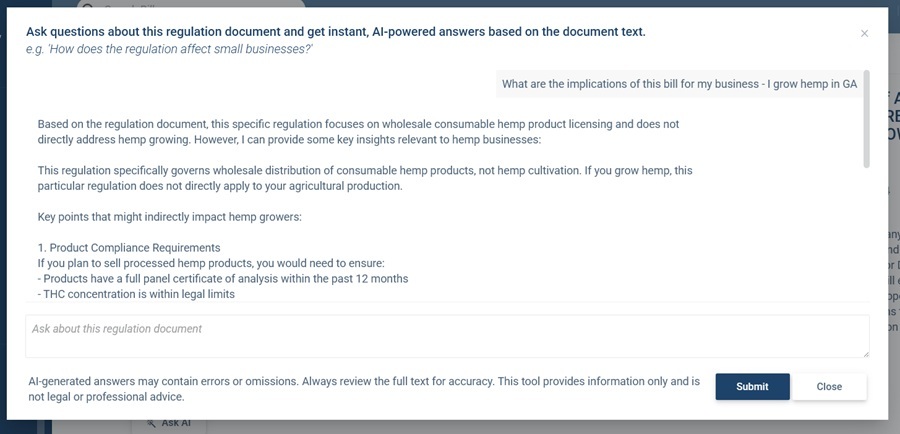
You can then ask a follow up question if you wish by typing it in the box.
A few points to note:
- You can have a conversation with RegBot! This means you can ask direct follow up questions such as "What about for wholesalers?"
- The response will be based on an analysis of the document you selected, not the regulation as a whole.
- You cannot export the responses directly to a regulation sheet at the moment, but you can copy and paste into a text box custom column manually. Here is how to create a custom column.
Of course it's important to remember that AI generated responses can be wrong or misleading, so it's important to check the regulation text yourself before relying on RegBot's answers. And RegBot hasn't finished law school, so its answers do not constitute legal advice!