
- Blog Post
- Estimated Read Time 2:00
- Getting Started
Executive Orders Tool
The executive orders tool can be found near the bottom of the main blue menu on the left when you are logged in to BillTrack50, with either a free account or a subscription account. It is also available here for anyone who doesn't have a BillTrack50 account.
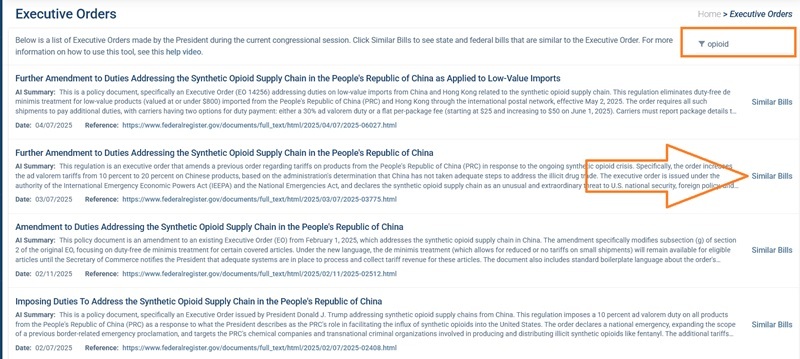
The tool will first show you a full list of presidential executive orders issued in the current congressional session, in date order with the most recent first. It does not show state level executive orders from governors. Each order will show the title, a plain English AI generated summary of the order, the date it was issued, and a link to the order on the federal register.
You can search for specific types of orders using the filter box at the top right. For example, in the image below I have filtered on the word 'opioid' to just get orders related to opioids. It filters on the title of the order and the AI summary text.
Similar Bills
You can see a list of related bills from Congress and the states by clicking Similar Bills on the right of a particular order. The AI will return bills that are on a similar topic, they may not be written in direct response to the executive order.
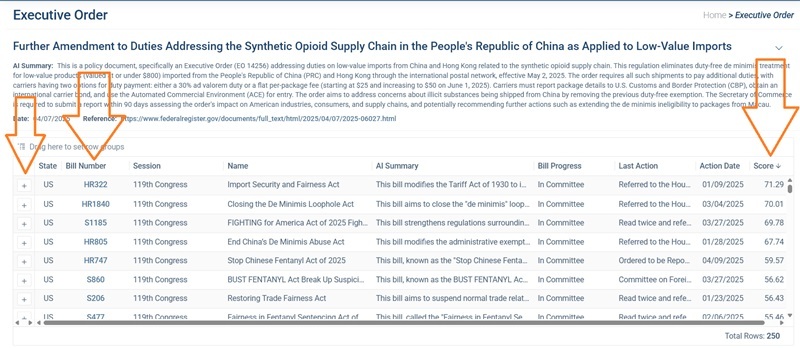
It will always return 250 bills, though not all will be relevant. As with our other similar bills features, there is a score column to the right which shows how similar the AI thinks the bill is to the executive order. Bills are displayed in order, with the most relevant on top. The grid shows familiar information, including an AI summary of the bill. Clicking the bill number will take you to the bill page for more details on the bill. And you can add the bill to any of your bill sheets (if you have a subscription) by clicking the + symbol to the left.
How Can You Use the Tool?
The tool is a good starting point for any research into how the states and Congress are responding to the president's agenda. The bills will give you a good idea of the bills being introduced for a specific topic and allow you to see whether legislators are introducing bills that either support or oppose the president's orders. Or perhaps there won't be a significant amount of relevant legislation on certain topics that are the purview mainly of the president, such as defence.
When you find bills that are of interest, you can make a bill sheet and add bills directly from the tool to get you started. You'll probably want to then use the bill sheet similar bills feature to find more bills, and use the AI bill summaries to choose suitable keywords for your bill sheet so you can catch any new bills being introduced.