
- Blog Post
- Estimated Read Time 0:02:05
- Intermediate
How to Renew Your Subscription
Note:
*BillTrack50 subscriptions do not auto renew! And we do not store credit card information, you will need to enter that again*
*Only the company administrator can renew a subscription*
If you have any special requirements with your subscription, or any problems with your renewal, then do reach out to your Customer Success Manager or contact Karen and we'll help you.
When you get to within 30 days of the expiration date for your subscription, you will get a reminder email. A red reminder alert will also appear at the top of the screen when you're logged in to BillTrack50. You can click on it to see how long you have before your subscription expires:

If your subscription has already expired, you will see this:

You can click on the 'account management' link in the alert to go straight to the subscriptions page, or click your name in the top right then Manage Account and then Subscriptions:
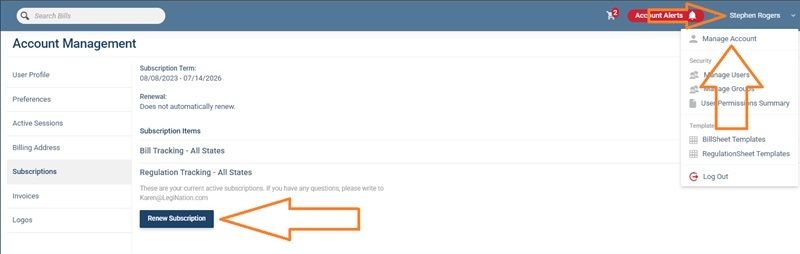
Click the button at the bottom to renew your existing subscriptions.
When you click Renew Subscription you will be taken to your Subscriptions Cart:
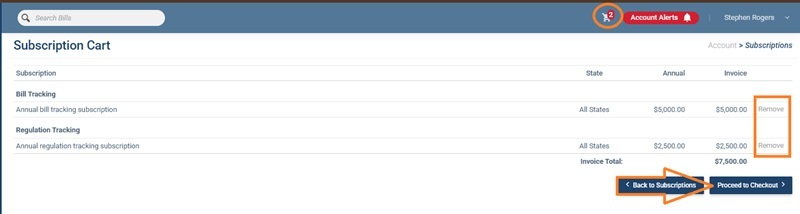
All your existing subscriptions have been added automatically, and the shopping cart icon at the top tells you how many products you have. If you want to remove any subscriptions, click Remove on the right.
Or you can click Back to Subscriptions to add more products, such as additional states.
When you are ready, click Proceed to Checkout.
You'll have the opportunity to update your company address and name, then click Payment Method to proceed.
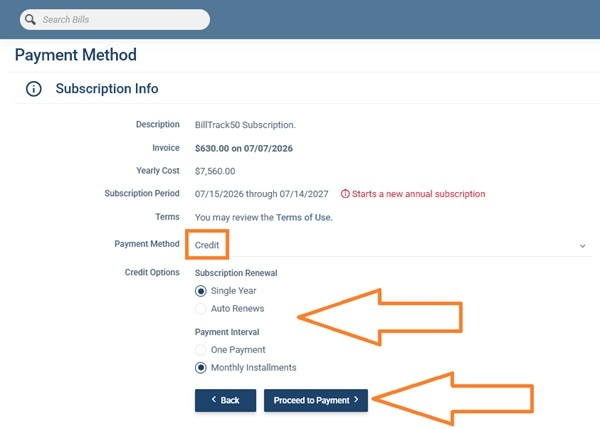
The Payment Method page will summarize your subscriptions and give you the option of paying immediately by credit card, or generating an invoice that you can pay later using a credit card, ACH, check or other payment methods.
To pay by credit card, first decide if you want to pay just for a single year or switch on auto renew. If you do choose auto renew, you can switch it off at any time in the account menu. You can also choose to pay monthly if you wish, the overall price remains the same.
Then click Proceed to Payment and enter your credit card information. We use Stripe to manage payments, so your credit card information is not stored.
Click Pay Now and that's it, you're done. Thank you for sticking with us for another year!
To generate an invoice, choose Invoice from the Payment Method drop down menu:
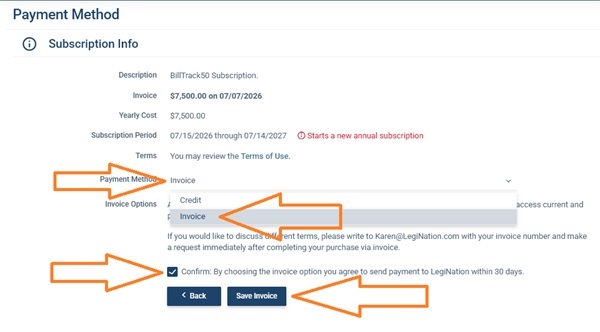
Check the box to confirm you agree to pay within 30 days and click Save Invoice. Your subscriptions are now renewed and you can enjoy BillTrack50 for another year. Thank you!
The invoice will automatically be downloaded to your computer and you can pay it using your preferred payment method such as check or ACH. You can also go to the Invoices page by clicking your name in the top right, then Manage Account, then Invoices to see your outstanding invoices:

Here, you can click Save to download the invoice again, or Pay to pay it by credit card. You can also check the Show Past Invoices box to see the invoices you have already paid.