
- Blog Post
- Estimated Read Time
- Getting Started
How to Use Plain English Searching
The standard way to find bills is using keywords - words or phrases that appear in the bill text or title. Sometimes, though, it can be hard to find all relevant keywords so you can be sure you aren't missing bills. And you will probably end up with a lot of irrelevant bills to filter out.
That's where plain English searching comes in - provide a clear description of the bills you are looking for and our friendly AI will go and find them for you.
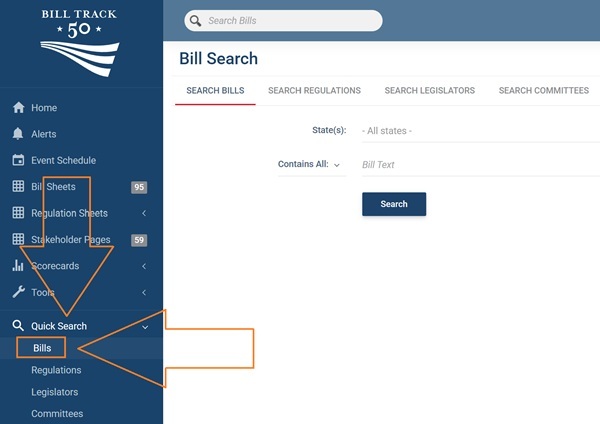
To start, click Quick Search in the blue menu to the left. Then choose Bills:
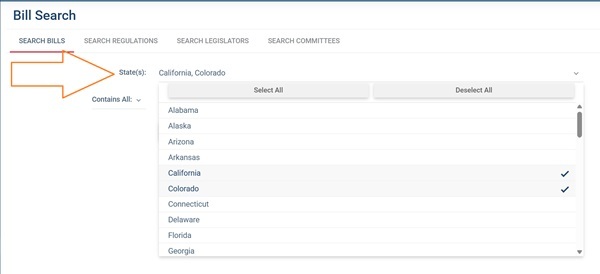
Then, select your states from the drop down menu or leave it to search all states (and federal).
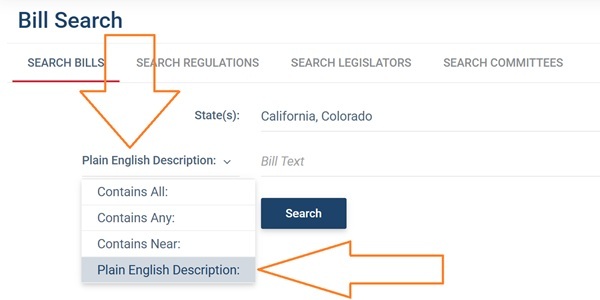
Now, choose Plain English Description from the search drop down menu:
Finally, write a description of the bills you want to find. Keep the language simple and specific, to help the AI understand what you want. Then click Search.
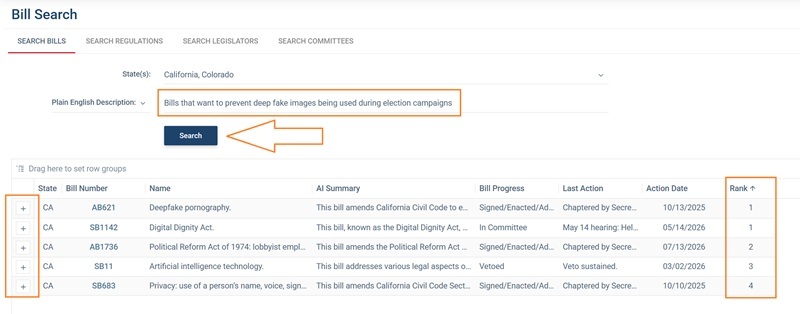
The bills will be ranked according to relevance to your search. The AI shouldn't return irrelevant bills, but it will decide which bills it thinks most closely match your search.
You can now add the bills to any bill sheet in the normal way using the + to the left of each row.
NOTE:
Plain English searching is currently only available in quick search. We do plan to to add it to bill sheet searching in the near future.
It is also currently only available for bill searching, not for regulation searching. Again, we plan to expend it to regulations in the near future.