
- Blog Post
- Estimated Read Time 0:01:34
- Getting Started
Date Range Options on Regulation Sheets
How can you control how far back the regulations in your regulation sheet should go? There are two options: you can choose a rolling date range such as 1 month or 6 months or a fixed date range, where you set a start and end date. Let's look at both in more detail.
NOTE 1: The date of a regulation on a regulation sheet will be the date for which we have the most recent activity, not the created date. So, for example, if a regulation's journey began in 2024 but it has had some kind of activity in 2025, then it is classed as a 2025 regulation for the purpose of the regulation sheet. This may affect the date ranges you choose in your search.
NOTE 2: Regulation data for all states is available for 2024 and later years.
To choose a date range, go to the bottom of the query tab and select Rolling Date Range or Fixed Date Range from the drop down menu:
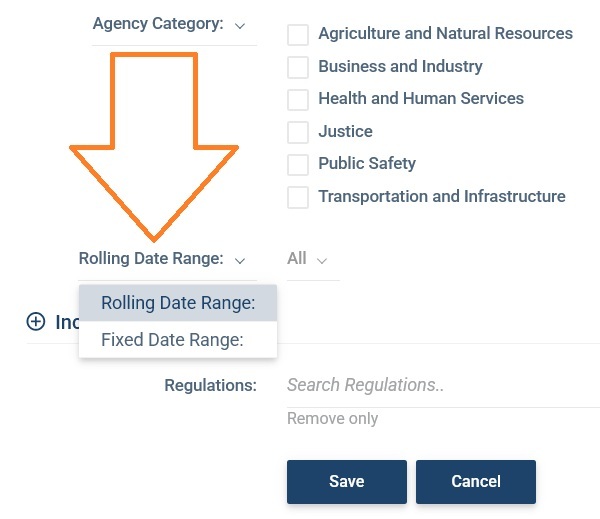
Rolling Date Range
The rolling period defaults to 'All' (so you'll see all the regulations that match your query going back to 2024). If you click 'All' you can then choose a different time period from 1 month to 24 months:
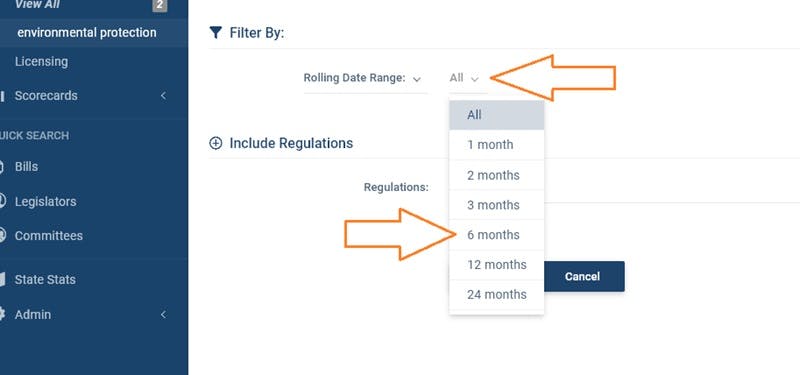
Remember to click save when you've chosen the time period and your regulation sheet will then update to just show regulations that have been added in the past X months. As time passes, new regulations will automatically be added and the regulations that fall outside of your chosen time period will drop off.
This way of filtering regulations will probably be the best way to set up your regulations sheets in most cases, so we strongly recommend that you go through all your regulation sheets and check that they are set up with a rolling date range.
Fixed Date Range
If you choose this option, you must enter either both a start and end date or just a start date. If you put both dates, your regulation sheet will not add new proposed regulations introduced after the end date. If you just put a start date, then new proposed regulations will be added, and your regulations sheet will get bigger over time.
This can be useful if you just want to look at regulations during a set period of time (perhaps you want to review environmental regulations proposed in California in 2021 for example). However, for ongoing monitoring of new regulations you may find the rolling date range to be more manageable.