
- Blog Post
- Estimated Read Time 1:00
- Intermediate
Searching for Bills by Topic
Query-type bill sheets include a Topics filter that lets you find bills by subject area rather than — or in addition to — keywords. This is useful when you want comprehensive coverage of a policy area regardless of the specific wording a bill uses.
Where to find it
Open the Query tab on any bill sheet. The Topics filter appears just below the Committee Category filter.
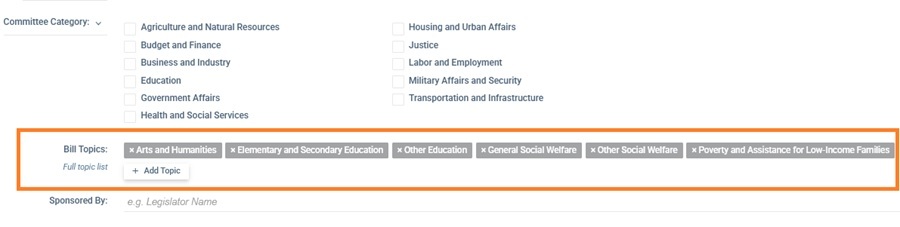
How to add a topic filter
- Click Add Topic.
- Select a major topic from the list — there are 21 to choose from, covering areas such as Health, Education, Immigration, Energy, Civil Rights, Transportation, and more.
- Select one or more subtopics within that major topic to narrow your results. For example, under Immigration you might choose Border Security, Deportation, ICE and Refugee and Asylum Policy.
- To add another subject area, repeat the process — select an additional major topic and its subtopics. You can combine as many as you need.
See the full list of topics and subtopics for everything that's available, including bill counts for each category.
Using topics on their own
Leave the keyword field blank and select only your topics. Your sheet will return all bills in the selected states that fall under those subjects — a good approach for a broad sweep across a policy area.
Combining topics with a keyword search
Add both keywords and topic filters to the same query. The topics act as an extra filter, so only bills that match both the keyword and the selected subject areas will appear. This is a reliable way to reduce false positives — for instance, searching for "artificial intelligence" alongside the Space, Science, Technology, and Communications topic will filter out bills that mention the phrase only incidentally.
How bills are categorized
Every bill is assigned to one or more topic categories based on its content, using a standard classification scheme drawn from the Comparative Agendas Project. The categories cover over 360,000 bills introduced since 2023, across 21 major topics and 256 subtopics. The categorization is made using an AI, which looks at each version of the bill and revises its assessment accordingly.
You can see which topics a bill belongs to on the Summary tab of any bill page. It is a good idea to note the topic areas of bills you want to follow, as that will help choose topics for your query.