
- Blog Post
- Estimated Read Time 1:00
- Intermediate
The Two Types of 'Similar' Searches for Regulations
There are two types of Similar searches that can be used when tracking regulations. Each function generates a list of up to 100 similar regulations; however, the results will differ depending on which Similar function you use.
Similar Function at the Bottom of the Regulation Sheet
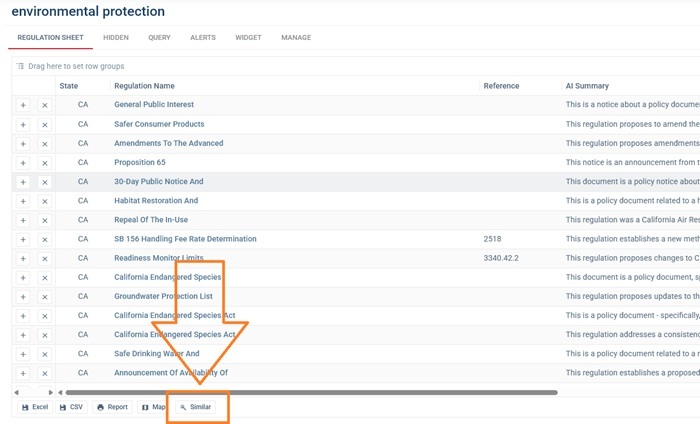
When you use the Similar function at the bottom of the regulation sheet, the AI reviews all the regulations included on that sheet to summarize their overall theme. Based on this summary, the system then generates a list of up to 100 regulations most similar to the entire regulation sheet.
The regulations produced by this search should not include any regulations already listed on the original regulation sheet or that are in the hidden tab and should align with the fixed date range and states specified in your query. The regulations the AI finds will be more relevant if your regulation sheet is already curated, so you have already worked on your query and hidden irrelevant regulations. This helps the AI work out what you are looking for.
You can add the regulations from the Similar tab to any regulation sheet by clicking the + button to the left of the regulation. You can also use the results to help refine your keyword search by looking at them and finding out why they didn't appear in the main search - what words are they using that you can add to your search?
Similar Tab on the Regulation Detail Page
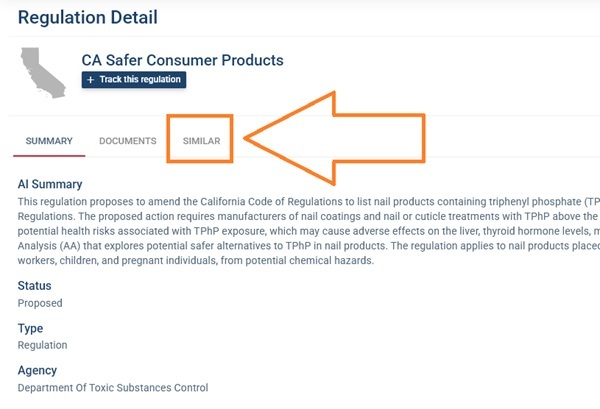
Using the Similar tab on the Regulation Detail page generates regulations that are similar to the specific regulation you are currently viewing. These results may include regulations already listed on your regulation sheet, as the AI isn't looking at the sheet, just the one regulation. The regulations will also be from any state in the country. While the results should generally align with your identified date range, it’s important to review them carefully—occasionally, regulations that fall outside of your specific date range may appear.
You can add the regulations from the Similar tab to any regulation sheet by clicking the + button to the left of the regulation. You can also use this to help you decide on good keywords to make a broader search, or use the results to populate an empty regulations sheet. This can be a quick way to pull relevant regulations together but remember that your sheet won't update over time with new regulations because you will have no kepyword search.
Viewing Similar Results
When using either Similar function, a similarity score between 0 and 100 is provided—the higher the score, the more alike the two regulations are to each align with each other. Roughly speaking, a score of 75 or above should be reasonably similar to the regulation.