
- Blog Post
- Estimated Read Time 1:00
- Getting Started
How to Create a New Bill Sheet
If you'd rather see a video walkthrough of the bill sheet types, see this video.
Start by clicking on the Bill Sheets option in the navigation panel and choose View All. This will take you to the main Bill Sheets screen with the + New Sheet button. Click that button!
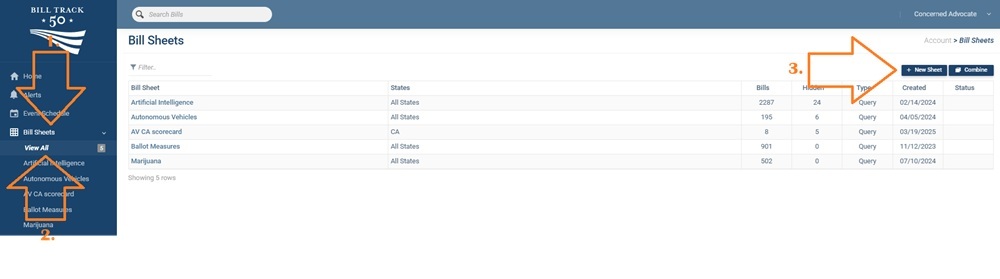
You'll be presented with three options:
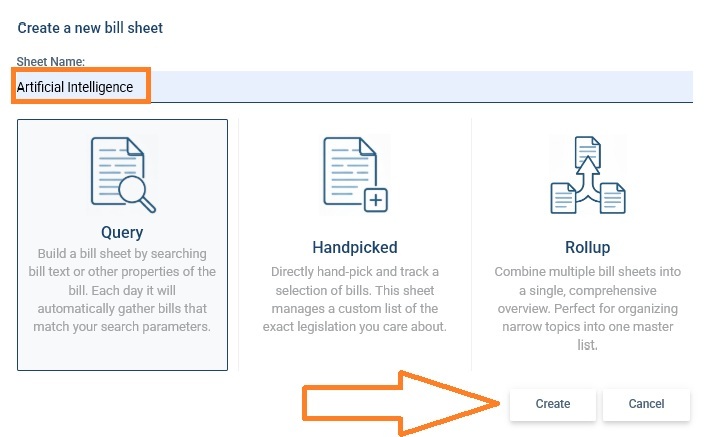
First, choose a name for your bill sheet. You can change it later in the Manage tab. Then select from three types of bill sheet and click Create:
Query
This is for a bill sheet that uses a Google-style standard English search or a keyword search - you can add search terms and find bills. If you leave the search blank, it will return all the bills from your selected states that match your selected filters, such as excluding resolutions or dead bills. NOTE: the maximum size for a bill sheet is 5,000 bills so if you have more than that you will get an error message and you will need to refine your search or filters to bring the number down.
When you choose the Query bill sheet type, you'll be taken to the Query tab of the new bill sheet to set up your search. See this post for more information on creating a good search.
Handpicked
This option is for sheets you intend to populate by hand, by adding bills manually or finding bills or regulations through AI searching and so on. There is no Query tab, instead you have a Pinned tab where you add bills.
When you choose the Handpicked bill sheet type, you'll be taken to the main Bill Sheet tab to see your bills. To add bills, go to the Pins tab and add bills manually by bill number in the Pinned Bills box. Remember to start with the two letter state code, then a space, then the bill number without spaces or other punctuation. Once you have entered 3 characters or more, it will start to autocomplete options for you.
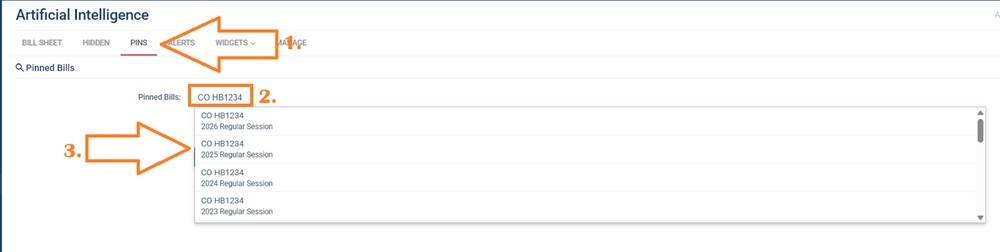
Note that the options will include bill numbers going back in time, with the most recent sessions at the top. Click an option to add it to your bill sheet.
You can also add bills by clicking the 'Track this Bill' button at the top of a bill page, or the + button next to bills on another bill sheet or in a similar bills AI search.
Of course, because there is no keyword search, no extra bills will be added overnight. Only bills that you add will be on the sheet.
Rollup
A rollup bill sheet allows you to combine two or more other bill sheets together. For more information on rollups, see this post.
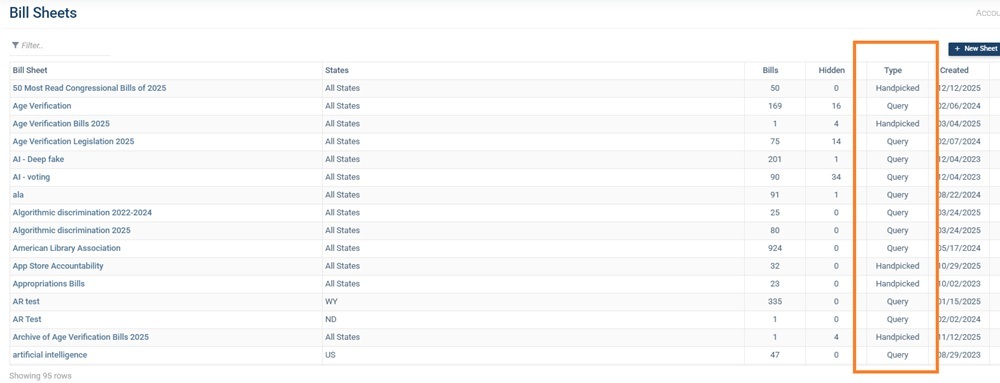
Your list of bill sheets will show what type each sheet is so you can check:
NOTE: If you've created a Query sheet and used the Search by Meaning option (either on its own or in combination with the keyword search), the bills will be in order of relevance with the most relevant at the top. You can see the relevance score by adding the Rank column to your bill or regulation sheet template. See this post for how to change the template. This column, however, will be meaningless for Handpicked or Roll Up bill sheet types.