
- Blog Post
- Estimated Read Time 0:03:49
- Intermediate
How to Make and Use Rollup Bill and Regulation Sheets
A rollup bill or regulation sheet is different from a regular sheet. Instead of entering a query you choose which sheets you would like to be “rolled up” and how you would like the combine to work. You can mix bill or regulation sheets like a legislative maestro!
You can also see this information in this video walkthrough.
Why Would I Roll Up?
There are many reasons you might want to combine several sheets together. If you have a complicated set of search criteria, even beyond our powerful search options, and you have needed to write several separate queries and bring their results together, you can now bring those results together into one sheet. To keep tidy, once you have the searches working like you want, you can also hide the feeder sheets from your account with our user management tool.
But there’s other fun ways to use the rollup sheets too. Maybe you’d like to make a map of all of your bills as well as let people see individual topics. Or maybe you want to prioritize bills or regulations that match several of your searches. Or maybe your stakeholders want one easy place where they can see all of the bills or regulations you are following.
How do I Roll Up?
Step 1) Create some bill or regulation sheets. They can be keyword based or a list of individual bills or regulations, or a mix.
Step 2) Create a new bill or regulation sheet using the Rollup option in the new Type section.
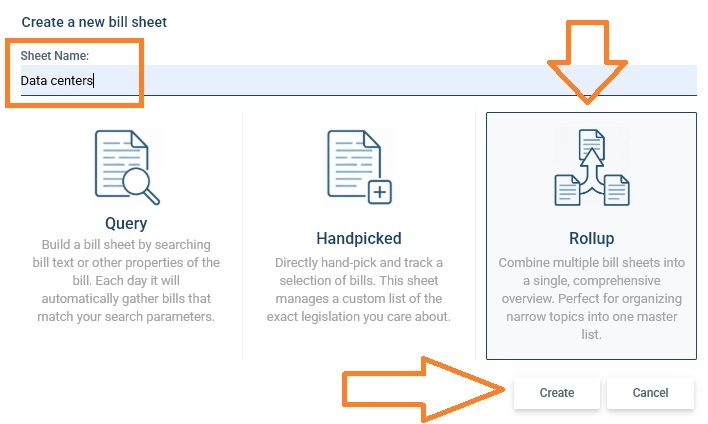
Step 3) Configure your rollup options.
First, choose the sheets you want to be rolled up:
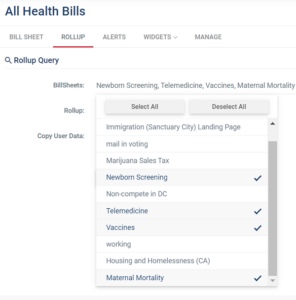
Second, choose how you would like the bill sheets to be combined (the options are the same for regulation sheets):
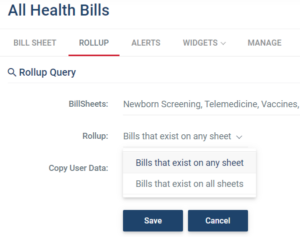
Do you want all bills that are on either sheet? In a Venn Diagram that would be the union of the bill sheets. Or do you only want bills that appear on all of your selected bill sheets — in other words where the sheets overlap? In a Venn Diagram that would be the intersection of the bill sheets.

Either way, we only include bills that are not hidden on the source sheets.
Third, decide if you would like to include user data:
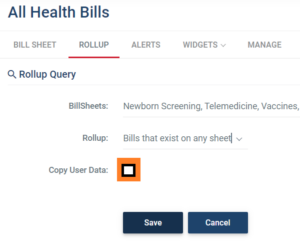
Copy User Data means that any data you have entered into your custom columns will be brought into your combined sheet. When a bill or regulation is on more than one sheet we will take the data from the first sheet (alphabetically), so keep that in mind to control which version of the bill or regulation is included on the rollup sheet. You can also enter custom column data into your rollup, but the data will be overwritten each night for the columns that exist in the sheets going into your rollup.
Step 4) Use your new rollup bill or regulation sheet for alerts, widgets, stakeholder pages, or anything else you would normally do with a bill sheet.
The only things you can’t do with a rollup sheet is add it to another rollup (you can’t roll up rollups) or add bills or regulations directly to it (they get added only by being on sheets you’ve chosen to include in the rollup). You also can't create a rollup that includes both bills AND regulations. It must be all bills or all regulations.
When does BillTrack50 refresh rollups?
Your rollup, including user data, is created as soon as you click “save” to create your sheet. We will update the rollup overnight each night before alerts go out, so if you set alerts on a rollup you’ll get new alerts just like with any other sheet. We DO NOT roll up while you are working on the underlying sheets, or entering data in your columns, or otherwise making changes during the day.
If you make changes that you would like reflected in your rollup, like x-ing out bills or adding comments in one of the source sheets, simply open the rollup sheet, go to the rollup tab, and click save. Saving a rollup causes it to be recalculated, updating both the bills included and the user data.
A Few More Details
Your rollup bill sheet has the same limit of bills as any other bill sheet: 5,000. If there are more total bills than that on your sheets then we just put the 5,000 bills with the most recent last action dates on your sheet. You are also limited to 52 sheets per rollup. If you need more please get in touch with us.
You can give anyone permission to see a rollup sheet, but they won’t be able to make changes on the rollup tab if they don’t have permission to the underlying sheets. But they can set up alerts and otherwise work with the rollup. You can also hide the underlying sheets from yourself to keep your account tidy (see this video for more on that) but you’ll need to unhide them if you want to make changes to the sheets included on the rollup. And finally rollup sheets won’t appear as an option when you are adding bills or regulations using the +, as you can’t add bills or regulations directly to them, you have to add them to the underlying sheet. Rollup sheets also won’t appear in the list of options on the rollup tab as you can’t roll up rollups.